

Component Jobs
Run a component or a flow through the Queue API, poll the job until it finishes, run a debug job, and read what the job object tells you about states, hierarchy and runtime settings.
Most operations in Keboola, such as extracting data or running an application, execute as background, asynchronous jobs. Triggering an operation creates a job; the job either starts or waits in the queue until it can. Because the execution is asynchronous, working with jobs through the API always means two steps: create the job, then wait for it to finish.
The API for that is the Queue API. It creates, terminates and lists jobs; the service itself is described in Job Queue. Every component sets its own upper limits on how long a job may run and how much memory it may use; those limits are a safeguard, set by the component developer.
Before you start
Section titled “Before you start”- A Storage API token, scoped to what the job needs; the token dialog in the first step shows how narrow it can be.
- The Queue host of your stack:
queue.keboola.comon US AWS,queue.eu-central-1.keboola.comon EU Frankfurt AWS; the service index lists yours. A wrong host or token answers withInvalid access token.
Run a job
Section titled “Run a job”You need a component ID and a configuration ID. The quickest way to read them off is the UI: run the configuration once by hand and open the successful job. Its detail lists the parameters the API call needs:
mode: runcomponent: keboola.ex-db-snowflakeconfig: 493493To list components and their configurations through the API instead, call
GET /v2/storage. Each component
in the response carries an id and a configurations array whose items carry their own id.
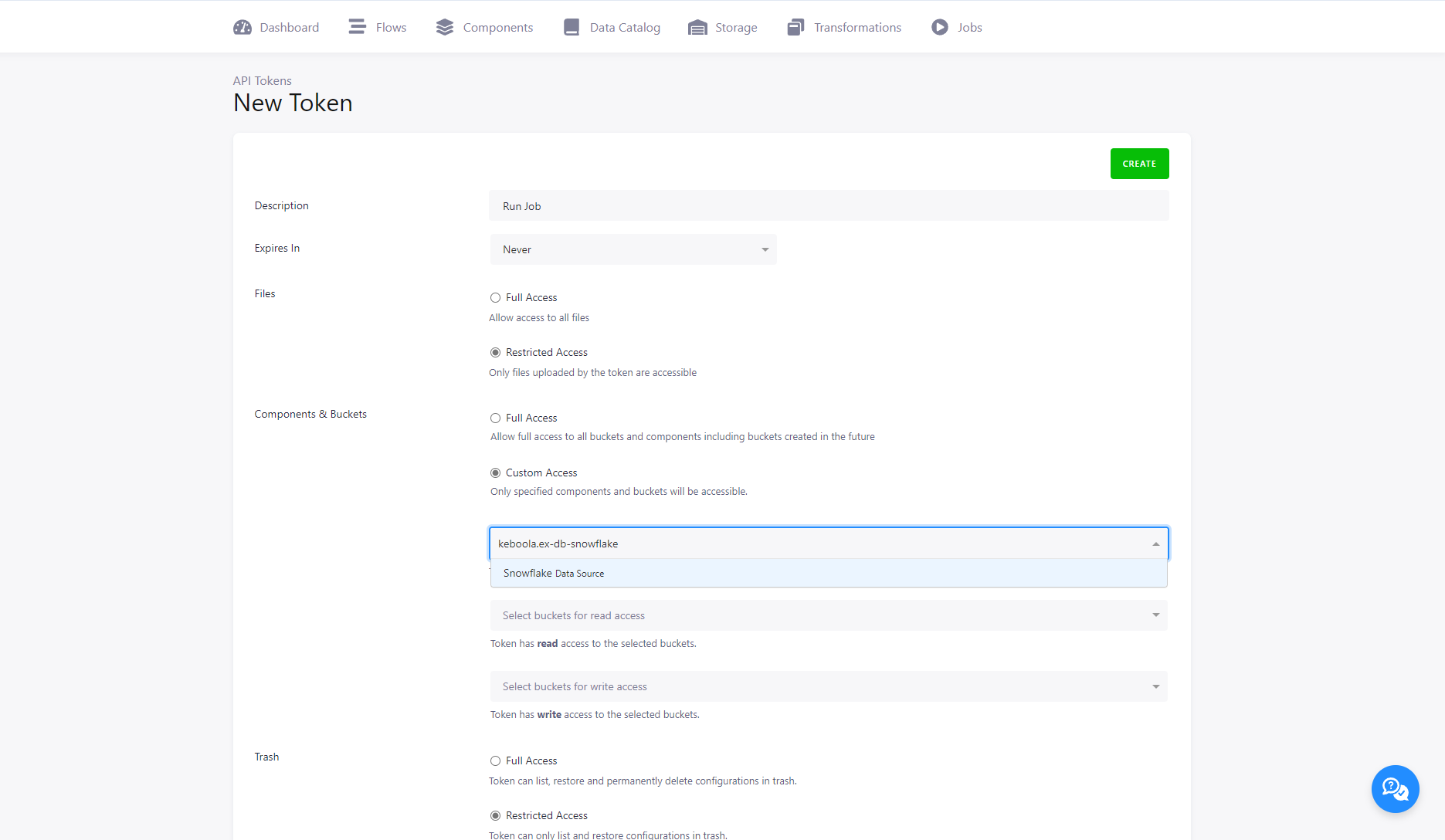
Then create a Storage API token for the calls. Make it as narrow as the job allows; here, limited to the one component:
Create the job with POST /jobs:
curl --location --request POST 'https://queue.keboola.com/jobs' \--header 'X-StorageApi-Token: YOUR_TOKEN' \--header 'Content-Type: application/json' \--data-raw '{ "mode": "run", "component": "keboola.ex-db-snowflake", "config": "493493"}'Use the queue endpoint of your stack; a wrong endpoint or
token answers with Invalid access token. The response is the job object, still in the created
state:
{ "id": "807932655", "runId": "807932655", "parentRunId": "", "status": "created", "desiredStatus": "processing", "mode": "run", "component": "keboola.ex-db-snowflake", "config": "493493", "configRowIds": [], "tag": "5.5.0", "createdTime": "2022-01-25T16:34:40+00:00", "isFinished": false, "url": "https://queue.keboola.com/jobs/807932655", "type": "standard"}The job starts on its own. The field you need next is url: it is the resource to poll.
Run a flow
Section titled “Run a flow”A flow runs the same way. The only difference is the component: keboola.flow for
Conditional Flows, keboola.orchestrator for Legacy Flows. They
are two separate components in the platform; the API call shape is identical, with the flow’s
configuration ID in config. The component line in the flow’s own job detail (see
Run a job) tells you which one you have.
curl --location --request POST 'https://queue.keboola.com/jobs' \--header 'X-StorageApi-Token: YOUR_TOKEN' \--header 'Content-Type: application/json' \--data-raw '{ "mode": "run", "component": "keboola.flow", "config": "1496488"}'Give the token full access to components rather than listing the components the flow uses. A list has to change every time the flow does.
Job polling
Section titled “Job polling”Poll GET /jobs/{jobId}
at the url from the create response. It returns the same job object with its current status;
keep polling until isFinished is true, or until status is one of the final states below.
Run a debug job
Section titled “Run a debug job”A debug job runs the component like a normal job, but uploads snapshots of the
data folder to your project’s Files and never
writes the component’s output to Storage. Use debug as the mode; optionally pin
the component version with tag to live-test
an image. Send it to the same POST /jobs as above:
{ "component": "keboola.ex-db-snowflake", "config": "554424643", "mode": "debug", "tag": "5.5.0"}You get one archive per stage. For component A with processors B and C in the after section:
stage_0: the data folder before A ranstage_1: before processor Bstage_2: before processor Cstage_output: before output mapping, after C finished
With configuration rows, the set repeats per row. If the job fails, only the stages before the error are uploaded.
Output mapping never runs, so a debug job cannot change your project’s Storage. It does run the component, though: anything with an outside side effect happens for real. A writer in debug mode still writes to the external system.
The snapshots contain every file in the data folder, temporary files included, but not the output
state.json, and every encrypted value is stripped from the configuration file with no way to
recover it. Keep the input mapping small, or the archives grow to gigabytes.
Job properties
Section titled “Job properties”Creating or reading a job returns a job object. Its full schema is in the Queue API reference; the fields that matter when you drive jobs are below.
Job status
Section titled “Job status”status moves through these values:
created: the job exists but has not startedwaiting: the job waits for other jobs to finishprocessing: the work is being donesuccess: finishederror: finished with an errorwarning: finished, but one of its child jobs failedterminating: a termination was requestedcancelled: terminated before the execution began, so it did no work at allterminated: terminated in the middle of execution, so any part of the work may have happened
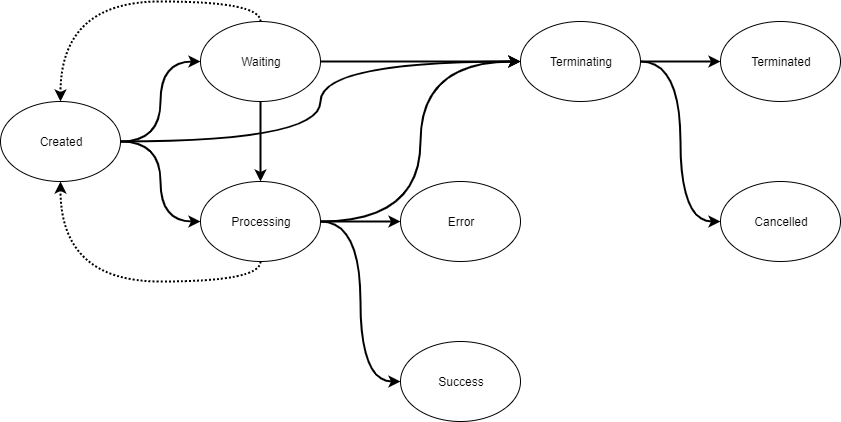
The diagram predates warning, which a container job reaches when one of its child jobs fails.
A job enters waiting only for reasons inside your project, that is, because of what else is
running there:
- Two jobs of the same configuration: the second waits for the first. This configuration lock protects the project from race conditions.
- Phases of a Legacy Flow: running one creates the jobs for all phases at once, and a phase that depends on another waits.
- Parallel limits: a configuration with 10 rows and parallelism 2 creates 10 jobs, 2 start
processingand 8 wait.
A job that cannot run for platform reasons, such as an outage or insufficient resources, stays in
created, and in rare cases such as a hardware failure it may return there. You cannot move a job
out of created yourself.
Only processing counts as runtime (durationSeconds) and is billed. waiting and created
jobs cost nothing; they are a plan of what will happen.
success, warning, error, cancelled and terminated are final; isFinished turns true. The job
object is immutable and eventually consistent: you cannot change a job after creating it, and the
fields that do change stop changing once the job is final. Next to status there is
desiredStatus, either processing or terminating. It flips to terminating when you request
a termination and cannot be changed in any other way.
Job ID
Section titled “Job ID”A new job gets an id, a runId and optionally a parentRunId. To create a job as a child of
another, send the parent’s run ID in the X-KBC-RunId header. runId then encodes the hierarchy:
the parent’s run ID, a dot, the job’s own id.
id=123,runId=123,parentRunId=null: no parentid=345,runId=123.345,parentRunId=123: child of123id=678,runId=123.345.678,parentRunId=123.345: child of345, grandchild of123
Nesting has no limit, and the relationship is weak: it groups jobs in the UI, and terminating a parent sends a termination request to its children. A parent does not wait for its children on its own; that behaviour comes from specific components, such as flows, or from the job types below.
Job configuration
Section titled “Job configuration”A job runs a configuration of a specific component. Pass a
stored configuration’s ID in config, as above. If the configuration has
configuration rows, configRowIds limits the run to the listed
rows; without it every row runs except disabled ones, and a row you list runs even if disabled. To
run in a development branch, pass the branch ID in branchId; without it the default branch is
used. Only the combination of component ID, configuration ID and branch ID is unique, so two
configurations may share an ID across components or branches.
Alternatively, send the whole configuration in configData. That is the contents of the
configuration node of a
stored configuration,
not the entire response. With configData, configRowIds and branchId are ignored, and
config is not read for configuration data.
config may still be required when the component
uses a default bucket,
because the referenced configuration then names the output bucket. configData always fully
overrides config.
Job mode
Section titled “Job mode”mode is run, forceRun or debug. run is the default. forceRun runs a configuration
that is disabled. debug is the debug job above, mostly for
component development.
Job runtime configuration
Section titled “Job runtime configuration”Runtime settings change how a job runs, not what it does:
backend.type: for Snowflake transformations, the size of the Snowflake warehouse; otherwise the container size. Values arexsmall,small,medium,large.parallelism: runs configuration rows in parallel. An integer from 2 to 100;infinityis still accepted for compatibility but is capped at 100. Unset, rows run one after another.tag: runs a specific version of the component’s code, mostly during development and debugging.
Runtime settings can live in the component configuration, in the job request (which overrides the
configuration), or on a flow (which overrides its individual jobs). In a configuration they sit in
a top-level runtime node, a sibling of parameters:
{ "parameters": { "...": "..." }, "runtime": { "tag": "my-branch-3" }}Every job of that configuration then runs the pinned tag (the job detail shows it in tag) until
you remove the key. This is the usual way to test a development build in one project without
touching the tag in the Developer Portal. Remove the key when done: a pinned
configuration keeps running the old image after new versions ship.
Job type
Section titled “Job type”type is one of standard, container, phaseContainer, orchestrationContainer or
retryContainer. Only standard jobs do actual work, consume billable time and count towards
resource limits; the others are virtual containers around standard jobs. A container holds the
parallel executions of configuration rows; an orchestrationContainer
holds a whole flow run; inside a Legacy Flow run, a phaseContainer holds
the jobs of one phase. These containers have a strong parent-child relationship: when a child fails, the
container fails too, subject to the onError setting. You never choose the type; it is set
automatically.
Working with the Jobs API
Section titled “Working with the Jobs API”The Queue API is the core. Calls from other services that usually come up alongside it:
- Create configurations
- List job events
- Encrypt values
- Run synchronous actions
- Subscribe to job events
- Schedule jobs
Component jobs are not the only asynchronous operations. Storage jobs, created for instance by asynchronous imports and exports, follow the same idea with their own details.